IOS 14: 7 must-know features to enhance your experience
Understanding iOS 14: Key Features and Enhancements
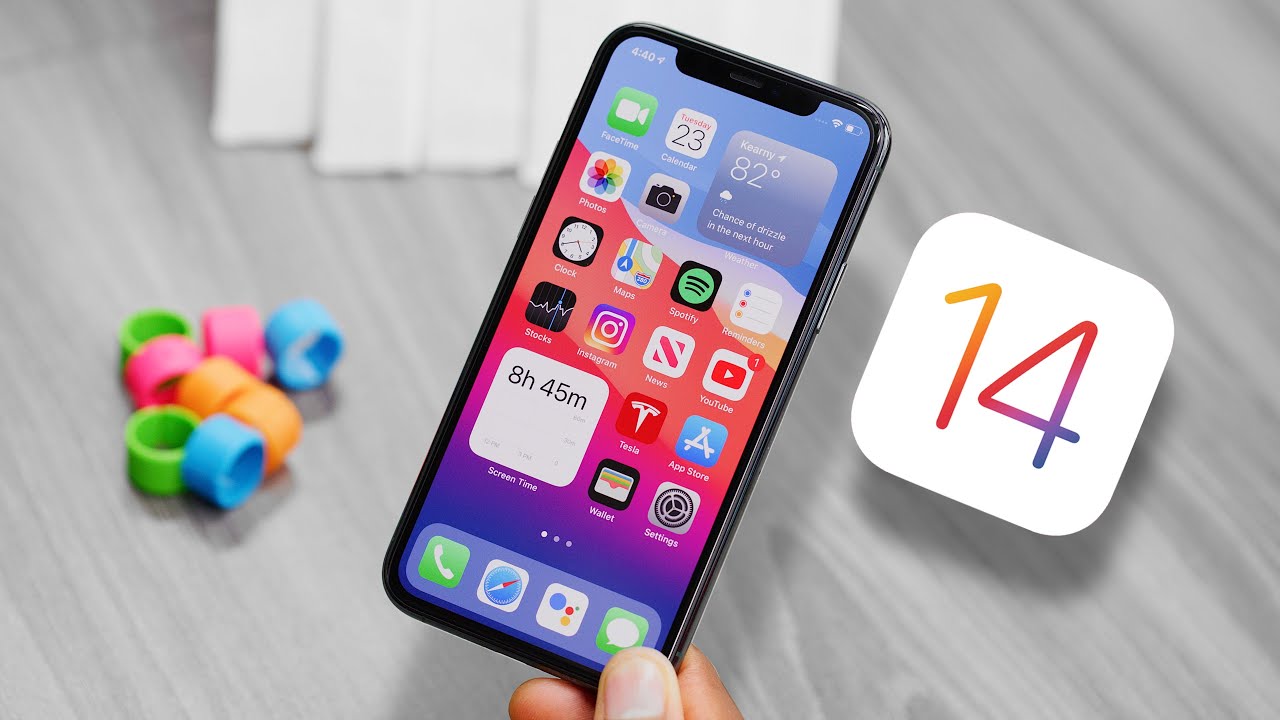
In September 2020, Apple launched iOS 14, introducing a host of features aimed at enhancing user experience on iPhones. One of the most notable changes was the introduction of widgets, which allow users to customize their home screens like never before. 🏠 Widgets came in various sizes and provided quick access to information, making it easier to stay organized at a glance.
Alongside widgets, iOS 14 also revamped the App Library, a new space that automatically organizes apps into categories, simplifying app discovery. Unlike previous versions, iOS 14 allows users to hide entire pages of apps, reducing clutter while optimizing the overall aesthetic of their home screen.
Home Screen Customization
With the arrival of widgets, home screen customization reached new heights. Users can not only add widgets of different sizes but also arrange them in a way that suits their preferences. This level of personalization was largely absent in earlier versions of iOS. For instance, unlike Android, where widgets have been available for some time, iOS 14 made it a seamless experience specifically tailored for iPhone users.
Enhanced Privacy Features
Privacy has always been a hallmark of Apple products, and iOS 14 took this commitment a step further. One significant enhancement is the App Tracking Transparency feature, which requires apps to obtain user permission before tracking their activity across other apps and websites. This is in stark contrast to some other platforms that do not prioritize user privacy to the same extent.


Moreover, users now receive a prompt whenever an app wants to access their location, ensuring more control over their data. This level of transparency reinforces Apple’s reputation for prioritizing user privacy.
Compatibility and Updates
iOS 14 is compatible with all devices that support iOS 13, including iPhone 6s and later. This broad compatibility ensures that a significant number of users can enjoy the latest features without needing to upgrade their devices. Regular updates further guarantee that users benefit from the latest security and performance enhancements.
What’s New in Compatibility?
- Device Support: iPhone 6s and later models。
- Frequent Updates: Apple offers regular updates for security and performance.
- Feature Replication: Enjoy similar features across devices, ensuring consistency.
- Trial and Beta Testing: Engage in beta testing to experience features before full release.
How iOS 14 Improves User Engagement
iOS 14 offers numerous updates aimed at enhancing user engagement. For example, the introduction of Picture in Picture (PiP) mode allows users to continue watching videos while multitasking within other apps. This feature is particularly beneficial for educational purposes, as users can follow along with video tutorials while taking notes in another app.
Furthermore, with the new Messages app updates, users can now pin conversations, making it easier to access important chats. This feature is a clear reflection of how iOS 14 seeks to improve the communication experience for its users, surpassing traditional messaging apps.
Integrating Complementary Tools with iOS 14
By employing complementary tools alongside iOS 14, users can unlock even more potential. Here are some key tools that enhance the overall experience:
1. Notion
Notion is an all-in-one productivity tool that integrates seamlessly with iOS 14. With its flexible usability, it allows users to organize notes, tasks, and databases effortlessly. To explore more about Notion, visit their official site here.
2. Microsoft To Do
Using Microsoft To Do alongside iOS 14 is a game-changer for task management. This tool allows for:
- Task Synchronization: Keep tasks updated across devices.
- List Sharing: Collaborate on projects effortlessly.
- Digital Reminders: Stay on top of important deadlines.
- Strategic Planning: Organize tasks with subtasks and due dates.
Discover more about Microsoft To Do on their official page.
3. Zoom
Zoom’s compatibility with iOS 14 enhances virtual meetings with fluid video calls. This integration transforms communication, especially for remote work scenarios.
4. Evernote
Evernote works beautifully with iOS 14 for note-taking, ensuring all essential notes are organized and easily accessible.
5. Headspace
For users focused on wellness, Headspace offers mindfulness and meditation sessions that can be easily accessed on iOS 14, enriching daily routines.
6. Apple Fitness+
iOS 14 users can maximize their fitness journeys with Apple Fitness+, integrating tailored workouts and health tracking seamlessly.
7. Slack
Enhance team collaboration with Slack’s integrations for quick messaging and file sharing on iOS 14, ensuring teams stay connected.
8. Trello
By using Trello with iOS 14, users can manage projects efficiently. Here are some benefits:
- Visual Task Management: Organize tasks via boards and lists.
- Collaboration Tools: Share boards with team members for instant collaboration.
- Automation Features: Automate repetitive tasks to save time.
- Deadline Tracking: Easily manage deadlines with calendar integration.
Learn more about Trello on their official website.
9. Google Drive
Seamlessly access and share files with Google Drive while using iOS 14, streamlining work processes significantly.
10. Pocket
Save articles and videos for later viewing directly through iOS 14, enriching the browsing experience and making content accessible anywhere, anytime.
Exploring Specific Uses of iOS 14
iOS 14’s features can be utilized creatively to maximize productivity. For example, by combining iOS 14 with Microsoft To Do, not only will you have your tasks organized, but you can also receive reminders for important deadlines, ensuring nothing falls through the cracks.
Another use case is leveraging the Picture in Picture mode while using Zoom. This feature enables users to participate in virtual meetings while accessing notes on Notion, making multitasking incredibly efficient. This is one of the reasons to choose iOS 14 – it extends functionality by allowing users to operate multiple tools simultaneously, improving workflow.
Continuing to Discover iOS 14 Features
But that’s not all; iOS 14 further enhances the phone experience with features like **Apple Maps** updates, which now include cycling directions and electric vehicle routing. This kind of attention to detail not only aids in navigation but also reflects an understanding of user needs, especially for those who are eco-conscious.
Another fascinating enhancement is the improved Siri capabilities. With the navigation abilities of Siri, users can now receive contextually aware information based on their location. This shift makes Apple’s voice assistant incredibly responsive and knowledgeable.
Conclusion
While it’s essential to explore the full suite of features that iOS 14 offers, understanding how to synergize these features with complementary tools can lead to a revolutionary user experience. Through customization, privacy, and user engagement enhancements, iOS 14 stands out in the crowded landscape of mobile operating systems.
Exploring New Privacy Features in iOS 14
iOS 14 has introduced compelling updates, particularly in the realm of privacy. 🛡️ With users becoming increasingly concerned about their data security, Apple has taken significant steps to enhance user protection. The App Tracking Transparency (ATT) feature is one of its standout elements, requiring apps to request permission before tracking users across other applications and websites. This feature empowers users to decide how their data is used, promoting transparency and control.
Additionally, privacy labels are now included on the App Store, allowing users to see what data an app collects before they download it. This means users can make informed choices based on their privacy preferences, which is a crucial aspect of the overall user experience in iOS 14.
Compared to previous iOS versions, iOS 14 stands out for how it places user consent at the forefront. Unlike some competitors, which may continue data tracking by default, Apple embraces a user-centric approach. By prioritizing privacy, iOS 14 enhances user trust, which is essential for fostering long-term customer loyalty.
Widgets: A New Take on a Classic Feature
The introduction of customizable widgets is another significant highlight of iOS 14 🎨. These widgets allow users to personalize their home screen with information that matters to them. The ability to size and arrange widgets provides a fresh look and makes it easy to access essential apps and data at a glance.
For instance, by combining iOS 14 with widgets from the App Store, users can create a tailored experience that enhances their day-to-day interactions with their devices. Users can choose from various widget sizes and styles, integrating their favorite apps seamlessly into their home screens.
What’s fascinating is how widgets can reflect real-time data. An example of this is using a weather widget to see current conditions without opening the app. By utilizing these features, users can navigate their devices more efficiently, saving time and optimizing productivity.
Siri’s Enhanced Functionality
Siri has received an upgrade in iOS 14, enhancing its functionality to make it more powerful. 🗣️ Users can now send audio messages directly and get restaurant recommendations across multiple platforms. This improvement provides users with more versatile ways to interact with their devices.
When coupled with apps like Apple Music, Siri becomes an even more handy tool. Imagine asking Siri to play a specific song while you’re busy cooking or driving. This hands-free capability not only enhances the user experience but also integrates seamlessly into daily life.
Moreover, compared to other voice assistants, Siri on iOS 14 provides a more personalized experience. Its deep integration with the Apple ecosystem means it understands your preferences better, making it easier to find the right content or perform tasks effectively.
Messages: Group Chats and Enhanced Features
The upgrades in the Messages app are another reason to appreciate iOS 14. With the introduction of mentions in group chats, users can now direct messages to specific people, making conversations more organized. 📱 Additionally, users can set group photos, allowing for a more personalized experience in group communications.
Using iOS 14 alongside tools like Slack can enhance collaboration. For example, use Messages for quick conversations while relying on Slack for project management. This combination helps streamline communication across various platforms, making teamwork more effective.
App Clips: Instant Access to Apps
Another innovative feature in iOS 14 is App Clips. These lightweight versions of apps allow users to experience a service without downloading the full application. 🔄 By simply scanning a QR code or tapping an NFC tag, users can access the necessary app functionalities on the spot. This is particularly useful for service providers or stores that want to offer quick access to their services.
Imagine using App Clips for a quick coffee order at a café. Integrating this feature with platforms like DoorDash allows users to order food quickly without needing the app installed. It streamlines the user experience, giving convenience and efficiency.
iOS 14 Home Screen Experience
iOS 14 brings a revamped home screen experience with the addition of the App Library. 🌠 This feature automatically organizes apps into categories, allowing users to find what they need without scrolling through countless pages of icons. It’s a significant change that enhances usability by reducing clutter.
To complement this experience, integrating iOS 14 with organizational tools like Todoist can improve productivity. Users can create task lists and reminders directly from their home screens, helping to keep daily tasks in check while enjoying a streamlined interface.
Maps: Better Navigation and New Features
The Maps app has received a major facelift in iOS 14, offering features like cycling directions and the ability to discover new locations with ease. 🗺️ The addition of guides makes it simple to explore new areas based on curated suggestions, which is perfect for those who love to travel.
When you combine iOS 14’s Maps with navigation tools like Google Maps, you can access general maps and local business information. While iOS Maps may excel in integration with other Apple services, using both can offer a comprehensive view of your navigational needs.
Health & Fitness: Staying Fit with iOS 14
Health and fitness tracking has also improved significantly. The Health app integrates seamlessly with various fitness tools like MyFitnessPal, allowing users to monitor their nutrition while keeping track of workouts. 🏋️♂️ This powerful combination makes it simpler to achieve personal health goals.
Using MyFitnessPal together with the Health app, users can sync their physical activity data and dietary intake seamlessly. This synergy enables a more comprehensive understanding of health metrics, ensuring users stay informed about their progress.
Using iOS 14 with Automation Tools
iOS 14 offers a perfect opportunity for users to leverage automation tools such as IFTTT. This service helps users to create specific triggers and actions, making their devices respond to certain conditions. 🔔 For instance, you can set it up so that every time you get a new photo in your library, it automatically uploads to your cloud storage, ensuring seamless backup without manual intervention.
Benefits of Using IFTTT with iOS 14
- Automate Tasks: Reduce manual entry by syncing different apps and services.
- Seamless Integration: IFTTT connects thousands of apps for a more cohesive user experience.
- Customizable Workflows: Personalize your automation to suit your daily routines.
- Time-Saving: Focus on more important tasks as repetitive tasks become automated.
Enhancing the iOS 14 Experience
In summary, iOS 14 offers a wealth of features that enhance user experience significantly. The combination of privacy measures, new interface designs, App Clips, and enhanced Siri functionalities together forms a robust platform for users. By pairing iOS 14 with complementary services like Zapier, users can unlock even greater functionality.
Key Takeaways with Zapier
- Streamlined Workflows: Save time by automating repetitive tasks between apps.
- Increased Productivity: Focus on value-added tasks while automation handles the rest.
- Interactive Notifications: Set up alerts based on specific triggers within your systems.
- Integration with Multiple Platforms: Creates a more cohesive experience across your app ecosystem.
By exploring the possibilities of iOS 14 and how it integrates with various tools and applications, users can elevate their mobile experience to new heights. What you’ve discovered here might surprise you! Stay tuned for upcoming updates and enhancements!
Customizing Your Experience with iOS 14
Exploring iOS 14: Features, Benefits, and Complementary Tools
Have you ever wondered how a simple update could completely transform your device? 😊 With iOS 14, Apple has done just that, introducing a plethora of features designed to enhance user experience and functionality. In this article, we’ll delve deep into the various aspects of iOS 14, its major features, and how complementary tools can elevate your overall experience.
Key Features of iOS 14
iOS 14 is packed with notable features that fundamentally change how users interact with their devices. Let’s explore some of the standout updates that make this version special:
Home Screen Widgets
One of the most talked-about additions in iOS 14 is the introduction of Home Screen Widgets. Unlike previous versions, users can now customize their home screens with valuable information at a glance. You can easily add widgets of different sizes and even create Smart Stacks that rotate through multiple widgets automatically based on your usage patterns.
App Library
The App Library automatically organizes all your apps into categories, significantly decluttering your home screen. Unlike previous iOS versions where you had to scroll through pages of apps, iOS 14 makes it effortless to find what you need. This feature enhances ease of use and improves workflow.
Picture in Picture (PiP)
Picture in Picture mode allows you to continue watching videos or taking FaceTime calls while multitasking with other apps. This is a game-changer for productivity, as you can easily interact with different applications without pausing your video content.
Improved Privacy Features
Privacy is a prominent focus in iOS 14. With features like App Tracking Transparency, users are more empowered, deciding which apps can track their data. This feature stands out compared to competitors, reinforcing Apple’s commitment to user privacy.
Customization Options in iOS 14
iOS 14 places a high premium on user customization, ensuring everyone can tailor their device to fit their preferences:
Changing Default Apps
For the first time, iOS 14 allows users to change their default web browser and email apps. Compared to older versions, this offers a flexibility that enhances user satisfaction.
App Clips
App Clips are lightweight versions of applications that allow you to use certain features without downloading an entire app. This is particularly advantageous for quick transactions, such as renting a bike or ordering food. It’s a fantastic way to experiment with apps before committing to a full download.
Enhancing iOS 14 with Complementary Tools
To maximize the functionality of iOS 14, consider integrating some complementary tools and applications into your routine. Here are several ideas that can enhance your user experience:
1. Shortcuts App
Utilize the Shortcuts app to automate tasks on your iOS 14 device. Create personal shortcuts for frequently used apps to streamline your daily activities.
2. Todoist
Using Todoist alongside iOS 14 can keep your tasks organized.
- Seamlessly integrate with Siri for task management.
- Utilize recurring tasks to manage daily routines.
- Prioritize tasks efficiently with its intuitive interface.
- Create projects to categorize your workflow.
3. Grammarly
Combine Grammarly with iOS 14 for enhanced writing. It helps you produce error-free text in emails or notes with real-time suggestions.
4. Google Drive
Store and share files easily with Google Drive, ensuring you can access your documents anywhere, anytime, right from your iPhone.
5. Slack
Using Slack can foster better communication and collaboration, especially when integrated into your daily workflow on iOS 14.
6. Evernote
Capture and organize your thoughts effectively with Evernote. It perfectly complements the new note-taking features in iOS 14.
7. Focus Mode
Utilize the built-in Focus Mode in iOS 14 along with Focus Timer to maintain productivity by blocking distractions.
8. Zoom
Using Zoom for video conferencing allows seamless integration with iOS 14, aiding in both professional and personal interactions.
- Join meetings directly from your calendar.
- Utilize Zoom’s virtual backgrounds for a professional look.
- Record meetings for later reference.
- Access Zoom’s chat feature for communication.
9. Spotify
Stream your favorite music while multitasking with Spotify, integrating effortlessly with the iOS 14 music controls.
10. Notion
Use Notion to organize projects and ideas, perfectly complementing your efforts to stay organized with iOS 14’s productivity features.
Conclusion and Key Takeaways
iOS 14 represents a significant leap forward in Apple’s mobile operating system. With features like Home Screen Widgets, Picture in Picture, and improved privacy settings, it enhances usability and provides a tailored experience for every user. By integrating iOS 14 with tools like Todoist or Zoom, you can maximize productivity and streamline your day-to-day activities. Don’t hesitate to explore all the updates and discover how they can make a difference!
Exploring iOS 14: Enhancements and Features to Elevate Your Experience
Are you ready to dive into the world of iOS 14? 🍏 This version of Apple’s operating system introduces exciting features and notable improvements designed to enhance user experience.
Overall Improvements in Performance and Stability with iOS 14
With iOS 14, Apple emphasizes performance and stability, offering users a slick and responsive interface. Compared to its predecessor, iOS 13, users can expect faster app launching times and improved overall system performance.
Additionally, iOS 14 supports more efficient memory management, which ensures that apps run smoothly even under heavy use. Transition to this version, and enjoy a noticeably better experience while multitasking or using resource-intensive applications.
Customization: Widgets and App Library
One of the standout features of iOS 14 is the introduction of widgets, allowing for a more personalized home screen. The new Widgets feature enables users to choose from a range of sizes and designs, making it easier to access app data at a glance.
Unlike previous versions, the App Library automatically organizes apps into categories, offering a cleaner look and more efficient navigation. Users can now find what they need without scrolling through endless pages of icons.
For instance, using **Widgetsmith** together with iOS 14 can take your customization to the next level by creating personalized widgets that align perfectly with your aesthetic. Learn more about this tool on their official page.
New Communication Features and Privacy Enhancements
iOS 14 brings enhanced communication capabilities, including improvements to FaceTime and messaging features. Group FaceTime now supports up to 32 participants, facilitating virtual gatherings like never before.
Moreover, Apple has introduced privacy features such as App Tracking Transparency, allowing users to choose whether they want apps to track their data. This aligns with Apple’s ongoing commitment to user privacy and sets a benchmark in the industry.
Enhancing Communication Experience
Combining iOS 14 with applications like Slack can streamline team communication. By integrating Slack into your iOS device, you can manage work chats effectively and sync with other platforms. For official downloads, check Slack’s official website.
App Enhancements: Messages and Safari
In the Messages app, users will find the ability to pin conversations to the top for quick access. This feature is especially useful for those who engage in numerous conversations daily.
Safari receives a significant upgrade with new features like integrated translation and improved privacy reports. Users can compare their password strength against known data breaches, enhancing personal security significantly.
Utilizing Third-Party Tools with Safari
To maximize your browsing performance alongside iOS 14, consider using tools like 1Password. This password manager enhances Safari’s security by keeping your credentials safe. Explore more about 1Password on their official site.
Health and Fitness Tracking Features
iOS 14 also expands on health and fitness capabilities, integrating deeper with the Health app to track a broader range of health metrics. Features like sleep tracking and even handwashing reminders are designed to help users manage their wellbeing effectively.
Integrating Fitness Apps for Maximum Benefits
Integrating iOS 14 with fitness apps like **Fitbit** can lead to improved tracking of your workouts and health metrics. Fitbit’s versatility allows syncing with Apple Health, offering comprehensive insights into your fitness journey. For more details, visit Fitbit’s official page.
Navigation and Maps Improvements
Apple Maps has undergone a significant transformation, with enhancements that make navigating cities easier and safer. Users can now find dedicated bike lanes or electric vehicle charging stations, optimizing their travel plans.
For instance, pairing iOS 14 with **Google Maps** can give users even more insights, especially when navigating unfamiliar areas. Google’s platform offers robust mapping data that complements Apple Maps perfectly.
Ideas for Using iOS 14 with Complementary Tools
Discover how pairing iOS 14 with other applications can elevate your experience:
- Using **Notion** to organize to-do lists, enhancing productivity alongside the Reminders app.
- Integrating **Trello** for project management while leveraging the Notes app for jotting down quick ideas.
- Employing **Zoom** for virtual meetings while coordinating schedules in the Calendar app.
- Utilizing **Pocket** to save articles while using Safari for reading on-the-go.
- Connecting **Spotify** for enhanced music streaming experience while using Apple Music for exclusive releases.
- Using **Microsoft Teams** for collaboration, while accessing documents through Apple’s Pages app.
- Leverage **Duolingo** for language learning, working in tandem with the Health app for overall mental wellness.
- Pairing **Dropbox** for cloud storage management with the Files app to access documents effortlessly.
- Using **Adobe Spark** alongside photos to create stunning graphics that can be directly shared on social media platforms.
- Integrating your **Amazon** shopping with Siri for quick access to your shopping list and order tracking.
Insights on Using Trello with iOS 14
Here’s a deeper look at how **Trello** can enhance your productivity with iOS 14:
- Visual Boards: Create boards that consolidate your projects in a visual format.
- Collaboration Tools: Easily share boards with team members for effective project management.
- Task Assignments: Assign tasks to specific team members directly from your iOS device.
- Notifications: Receive real-time updates and reminders, ensuring you never miss a deadline.
Exploring Dropbox with iOS 14
Utilizing **Dropbox** as a complementary tool can enrich your user experience on iOS 14:
- Seamless Access: Access your files from anywhere using the Files app integration.
- Collaboration Features: Share files easily with colleagues and collaborate in real-time.
- Cross-Platform Compatibility: Works well across various devices, ensuring your documents are available when needed.
- Backup Solutions: Store important files safely to guard against data loss, offering peace of mind.
Conclusion and Continuous Exploration with iOS 14
iOS 14 represents a significant leap forward in functionality and user experience. With its advanced features such as App Library and Widgets, improved privacy controls, and seamless integration with various tools, it enhances productivity and personalization for every user.
Moreover, by exploring compatible applications, one can further tailor their experience with iOS 14. So, why wait? Dive in, update your device, and discover all that iOS 14 has to offer!
